
Coupons
Paymery includes a built-in coupon system that allows admins to create discount codes for billing plans. Coupons can be percentage-based or fixed-amount discounts, with optional usage limits and date restrictions.
Where to Manage Coupons
Coupons are created and managed from the admin panel. Navigate to Admin → Coupons to create a new coupon or manage existing ones.
Important: Set the Default Currency First
Before creating coupons, make sure the site's Default Currency is correctly set in Settings. Coupon values are interpreted based on the currently selected currency.
This is especially important for fixed coupons because the amount is stored using the smallest currency unit.
Coupon Types
1) Percent (%)
A percentage discount reduces the plan price by a specific percentage.
- Value range: 1–100
- Example:
10means 10% off
2) Fixed Amount
A fixed discount is entered in the smallest currency unit. For example, in USD the smallest unit is cents.
- USD example:
500means $5.00 discount - When switching the site currency, review fixed coupons to ensure values remain correct
Creating a Coupon
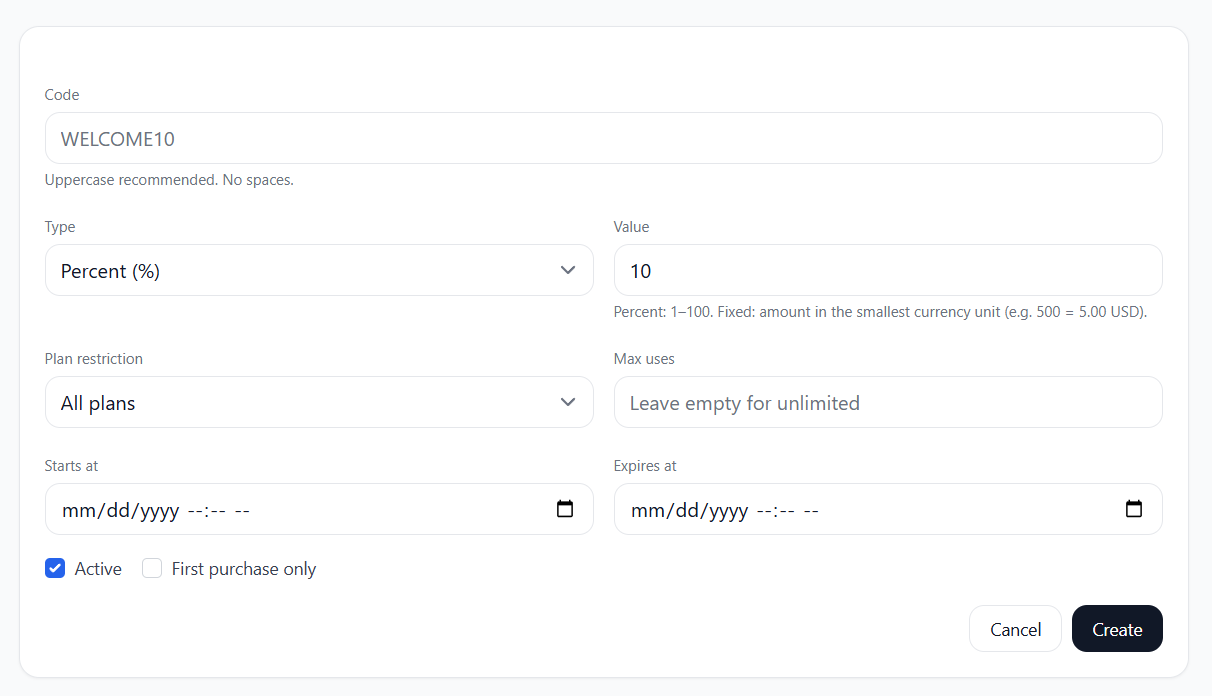
When creating a coupon, you can configure:
- Code: The coupon code (uppercase recommended, no spaces)
- Type: Percent (%) or Fixed
- Value: The discount value (percentage number or fixed smallest unit)
- Plan restriction: Apply to all plans or limit to a specific plan
- Max uses: Limit how many times the coupon can be used (optional)
- Starts at / Expires at: Set an active date range (optional)
- Active: Enable/disable coupon availability
- First purchase only: Allow coupon only for customers who have not purchased before
Example coupon creation form:
Notes
- Percent coupons are currency-independent, while fixed coupons depend on the selected currency.
- Date limits are recommended for time-based promotions (seasonal offers, limited discounts).
- Use First purchase only to target onboarding promotions.