
Plans
Paymery includes a flexible plans system that allows admins to create and manage billing plans. Plans control the pricing displayed to customers and the billing interval (monthly or yearly). If Stripe (Cashier) is enabled, each plan price must be connected to a Stripe Price ID.
Where to Manage Plans
Plans are managed from the admin panel. Navigate to Admin → Plans to create, edit, or disable plans.
Important: Default Currency
Before creating plans, make sure the site's Default Currency is correctly set in Settings. Plan prices are stored according to the selected currency. Paymery does not auto-convert between currencies.
Creating a Plan
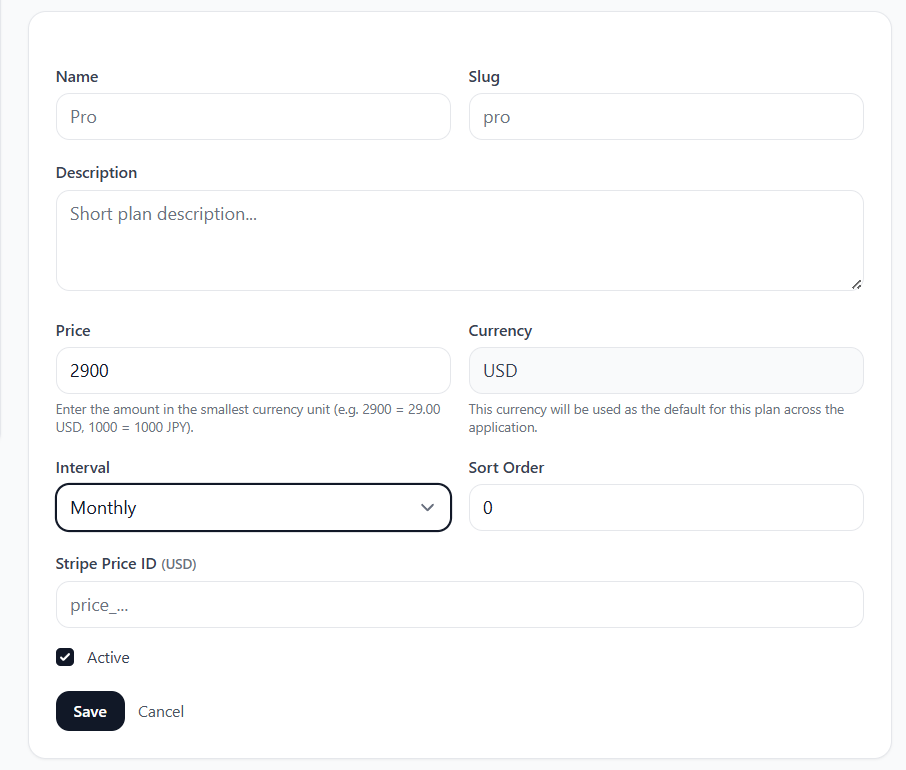
When creating a plan, you will configure the following fields:
Name
The plan name shown to customers (example: Starter, Pro, Business).
Slug
A unique identifier used internally. Use lowercase and no spaces.
Example: starter, pro, business.
Description
Optional short text shown under the plan name (example: "For small teams and growing products.").
Price (Smallest Currency Unit)
Plan price is entered in the smallest currency unit. Example for USD (cents):
1900means $19.00500means $5.00
The stored price follows the currently selected currency in settings.
Interval
Choose the billing interval:
- Monthly – billed every month
- Yearly – billed once per year
Sort Order
Controls the order of plans as displayed on the pricing page. Lower numbers typically appear first. Example: Starter = 1, Pro = 2, Business = 3.
Active
If enabled, the plan is visible and available for purchase. If disabled, it will not appear to customers.
Stripe Price ID (Only if Stripe is Enabled)
If your billing mode is set to Stripe (Cashier), you must provide a valid Stripe Price ID for each plan and currency.
Stripe Price IDs are created in your Stripe dashboard when you create products and recurring prices. Please follow the full step-by-step guide here:
Example plan creation/edit screen:
Notes
- Percent-based coupons are currency-independent, while fixed plan prices depend on the active currency.
- If you change the default currency later, define plan prices for the new currency first.
- For Stripe billing, ensure the Stripe recurring price currency matches the plan currency in Paymery.